
Your small business started Salesforce with 10 users and Starter Suite. Pipelines are clean, leads flow, basic reports work. Life is good.
Then growth hits: 25 reps, Service Cloud needs, custom fields, integrations, AI forecasting. Starter feels tight.
Scale Salesforce as SMB grows means expanding without rework, downtime, or $100k migrations. Salesforce built Starter → Pro → Enterprise paths for exactly this—same data, same logins, just more power.
This guide shows how SMBs scale Salesforce: edition upgrades, feature unlocks, governance rules, cost control, and real stories from 10→100 user journeys. No big bang rewrites. Just steady growth.
Scaling Salesforce isn’t “buy more licenses.” It’s strategic capability expansion timed to revenue milestones.
Think progression, not disruption:
Core principle: Single org evolves. No data migration hell. 76% of growing SMBs use this tech ladder for sustained 3x growth. Match edition to ARR milestones.
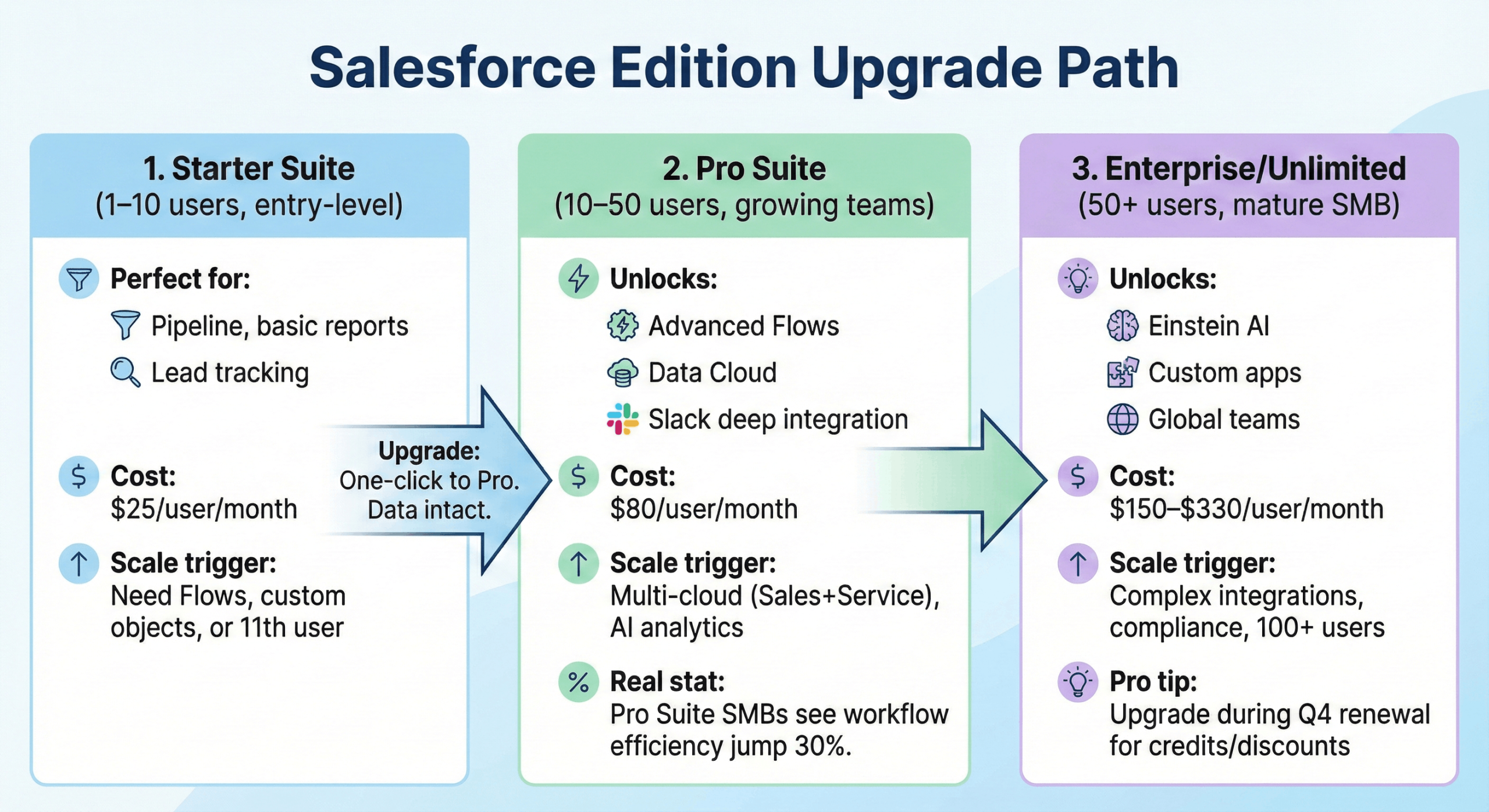
Perfect for: Pipeline, basic reports, lead tracking
Cost: $25/user/month
Scale trigger: Need Flows, custom objects, or 11th user
Upgrade: One-click to Pro. Data intact.
Unlocks: Advanced Flows, Data Cloud, Slack deep integration
Cost: $80/user/month
Scale trigger: Multi-cloud (Sales+Service), AI analytics
Real stat: Pro Suite SMBs see workflow efficiency jump 30%.
Unlocks: Einstein AI, custom apps, global teams
Cost: $150–$330/user/month
Scale trigger: Complex integrations, compliance, 100+ users
Pro tip: Upgrade during Q4 renewal for credits/discounts.
Before scaling Salesforce, know what’s actually working. Most SMBs discover 40% of users barely log in, top reps rely on personal spreadsheets, and leadership pulls manual exports weekly.
Login rates: Setup → Reports → Login History. Who logs in daily vs monthly? Low adoption = wasted licenses.
Top reports/dashboards: Reports → All Reports → Most Run. Are reps using your pipeline dashboard or building Excel shadows?
Pain points checklist:
Manual lead assignment (Slack fights)
Missing fields (GSTIN, deal size bucket)
No mobile access (field sales blind)
Export rituals (weekly CSV dumps)
Built-in tool: Setup → Company Information → Usage Dashboards. Reveals active users, storage, API calls in 2 clicks.
Output: 1-page summary = “3 power users, 7 ghosts, pipeline dashboard ignored, GST fields missing.” Scaling starts with reality.
Ask three questions that predict 80% of your scaling needs:
Users: “+10 reps hiring spree? Territory expansion? Global teams?” Each user = license cost + training time. Count headcount before upgrade.
Clouds: “Service Cloud for support? Marketing Cloud for campaigns? Commerce for e-commerce?” Multi-cloud = complexity jump. Pick the revenue-critical cloud first.
Automation: “Lead scoring? Contract approvals? Territory assignment?” Flows replace manual work. List your top 3 repetitive tasks eating rep time.
Integrations: “QuickBooks? SAP? WhatsApp? Custom ERP?” Every integration = setup + maintenance. Prioritize revenue blockers only.
Output: One page matrix matching growth pains to Salesforce capabilities. This becomes your upgrade justification for leadership.
Setup → Company Information → Upgrade Edition (3 clicks, 5 minutes).
Salesforce handles everything: licenses expand, new features activate instantly, zero downtime, zero data loss. Your Starter Suite org becomes Pro Suite—same logins, same pipelines, same records.
Pro tip: Time upgrades for Q4 renewal (free credits). Test new Flows in sandbox first. Team notices zero disruption, leadership sees instant Einstein/dashboard unlocks. Pure scalability magic.
Pro Suite instantly activates custom objects—crucial for India SMBs needing GSTIN fields, HSN codes, vendor tracking beyond standard Accounts.
Einstein lead scoring prioritizes hot leads using AI (no setup needed). Data Cloud unification merges WhatsApp/email/ERP data into one customer view, eliminating spreadsheet chaos. All point-and-click.
As your SMB scales from 10 to 50+ users, Salesforce becomes a shared system where bad decisions multiply fast—one rep creating risky reports, admins skipping tests, or security gaps exposing customer data.
The fix: Simple governance rules that scale:
Permission sets over profiles
Profiles lock users into rigid roles. Permission sets let you grant specific abilities (Reports Only, API Access, Marketing Automation) without touching core security. Add/remove as teams evolve.
Change sets for sandbox testing
Never deploy to production directly. Build in sandbox → deploy via change sets → test → go live. Prevents “works on my machine” disasters.
Admin team (2–3 people max)
One primary admin + 1 backup + 1 developer (if needed). More = conflicting changes. Document every decision in a shared Runbook.
Once your core Salesforce setup works, layering integrations and AI is how you scale without adding headcount.
Connect key tools through marketplace apps—accounting (QuickBooks), collaboration (Slack), and meetings (Zoom)—so data flows automatically and reps stop copy‑pasting between systems.
Then switch on Einstein to predict pipeline health, surface at‑risk deals, and prioritize high-value opportunities.
This AI layer turns Salesforce from a tracking tool into a decision engine, helping managers coach better and teams focus on the work that actually moves revenue.
Use a simple three-part cadence:
New user onboarding: Give every new hire a short, role-based walkthrough with real examples from your pipeline or support queue, so Salesforce feels useful on day one.
Advanced Trailhead paths: After basics, point power users to curated Trailhead modules that deepen skills around reports, dashboards, and automation—so your org keeps evolving instead of freezing at “MVP.”
Quarterly “wins” reviews: Once a quarter, review dashboards and specific success stories (deals saved, time reclaimed, errors reduced) that happened because people used Salesforce correctly. Publicly celebrate those wins to reinforce good habits and make the system feel like a shared achievement, not just “another tool from IT.”
Licenses: +$13k/year
Config: $10–20k (1-month project)
Total: $25–35k
Licenses: +$100k/year
Governance/AI: $30–50k
Total: $140k Year 1
Savings hack: Partner credits, phased rollout.
Key lesson: Scale matches revenue milestones.
Must-adds:
Slack: Cross-team alerts
Data Cloud: Unified customer view
Einstein: AI predictions
AppExchange: 7,000+ apps (industry-specific)
India SMB bonus: GST apps scale seamlessly.
Scaling Salesforce as an SMB works best when you treat it as gradual upgrades, not dramatic rebuilds.
As you move from Starter → Pro → Enterprise, the core org stays intact while you layer in things like Flows, AI insights, better permissions, and stronger governance.
That means less disruption for your team and fewer surprises for your budget.
A simple rule of thumb: around 10 users, Starter often fits; around 50, Pro starts to make sense; once you cross 100+ users or add multiple departments, Enterprise becomes worth it.
Review how people actually use Salesforce every quarter, retire unused stuff, and run fresh training so new capabilities translate into real-world impact.
Read more : Salesforce SMB Implementation Case Studies (7 Real Examples + Lessons)

 Chatbot