Posted on Leave a comment

Salesforce Data Migration Planning Checklist for Hassle-Free Success! (2025)

Salesforce Data Migration Planning Checklist

Is your organization moving to Salesforce or merging legacy data into your CRM? Then you already know: migrating data successfully is mission-critical.

But every data migration project carries risks—from lost records to broken relationships, duplicated accounts, or missing notes and attachments.

The good news? There’s a repeatable, battle-tested checklist to guide even complex Salesforce data migrations.

Stick with this guide for an end-to-end roadmap (with actionable hooks!) that ensures your data lands safe and sound—and your users love the new CRM.

Why Meticulous Salesforce Data Migration Planning Matters

Data migration mistakes can wreck user trust, disrupt workflows, and jeopardize months of preparation. Smart teams start with a planning checklist to minimize errors, clarify goals, and smooth the transition.

Imagine launching Salesforce with zero lost data, super-fast user adoption, and quality assurance built in—because you nailed the migration plan.

Salesforce Data Migration Planning Checklist

Let’s break the process down into easy-to-follow steps, with pro tips you’ll want to bookmark and revisit for every migration.

1. Define Migration Goals and Scope

Before jumping into tools, know why you’re migrating and what data you’ll move.

  1. List all business objectives (e.g., retire legacy system, integrate siloed data, comply with new regulations).

  2. Pinpoint the Salesforce objects that will receive mapped data—Accounts, Contacts, Opportunities, Cases, etc.

  3. Decide if it’s a full migration or a targeted subset (like historic leads or active deals).

Being clear on scope up front avoids last-minute surprises and wasted effort.

2. Engage Stakeholders and Build Your Migration Team

Every migration touches multiple business units, technical teams, and end-users.

  1. Identify project sponsors, Salesforce admins, technical leads, and power users.

  2. Assign clear responsibilities for mapping, validation, testing, and user training.

  3. Establish communication protocols (status reports, feedback meetings).

A cross-functional team prevents gaps and ensures no critical data or process is overlooked.

3. Audit and Analyze Source Data

Start with a deep dive on your legacy data:

  1. Audit data quality: flag duplicates, incomplete records, and non-standard entries.

  2. Assess custom fields, relationships, and business rules in the source system.

  3. Document unique IDs, dependencies, and critical records for mapping.

Auditing now saves headaches later—because “garbage in = garbage out” applies to migrations too.

4. Map Data and Plan Transformation

Effective mapping is the backbone of a smooth migration.

  1. Match fields in your legacy database to Salesforce’s data model.

  2. Note changes in field types, picklists, and validation rules between platforms.

  3. Plan any data transformations (e.g., splitting merged fields or converting date formats).

  4. Document parent-child relationships (like Accounts–Contacts) and sequence records appropriately.

Fail to map, plan to fail—alignment here is vital for data integrity.

5. Select the Right Migration Tools

Not all Salesforce data migration tools are created equal!

  1. Compare features like bulk processing, error handling, scheduling, and rollback options.

  2. Evaluate tools for compatibility with both your legacy and Salesforce orgs (think Data Loader, Informatica, Dataloader.io, MuleSoft, or custom APIs).

  3. Consider budget, support, and ease of use for ongoing needs.

The right tool can mean the difference between a smooth transfer and a long weekend of manual fixes.

6. Cleanse, Standardize, and Back Up Source Data

Data cleansing is a must before migration.

  1. Deduplicate records, standardize formats, and remove obsolete or inactive data.

  2. Validate mandatory fields and correct errors in relationships.

  3. Take full backups of all data (always) before starting migration.

Clean data accelerates migration speed and boosts post-launch user confidence.

7. Prepare Your Salesforce Org

Make Salesforce migration-ready:

  1. Disable auto-assignment rules, triggers, and unnecessary automations during initial loads.

  2. Set up necessary custom objects, fields, and record types.

  3. Assign roles and permissions for migration activities.

  4. Test data loads in a sandbox or staging environment first.

A prepared Salesforce org eliminates rework and surprises during cut-over.

8. Create a Detailed Migration Runbook

A migration runbook is your master playbook:

  1. Sequence migration steps: which records first, order of related objects, timing.

  2. List rollback protocols, error-handling strategies, and escalation contacts.

  3. Schedule time windows to minimize business disruption.

The runbook keeps everyone aligned, organized, and nimble for real-time pivots.

9. Test with a Pilot Migration

Before “go live,” test with a sample set of data:

  1. Select representative records, including parent-child relationships and edge cases.

  2. Migrate pilot data, then validate in Salesforce—check mappings, field types, and business rules.

  3. Collect feedback from project owners and power users.

  4. Document lessons learned.

Pilots catch issues early and give the team practice for the big day.

10. Full Migration Execution

With pilot learnings incorporated, it’s time to migrate:

  1. Run the full migration per your runbook, monitoring progress and logging errors.

  2. Track data volumes, issue rates, and system performance.

  3. Resolve exceptions quickly and maintain a log for lessons learned.

Eyes on the dashboard mean glitches get squashed before users even notice.

11. Post-Migration Quality Assurance

Once the bulk migration is complete:

  1. Validate data completeness, accuracy, and relationships in Salesforce.

  2. Assign users to interact with real records, reporting missing info or discrepancies.

  3. Check workflow, automation, and reporting—nothing left to chance.

  4. Clean up duplicates, perform final data cleansing.

End-user feedback ensures a smooth transition and fast adoption.

12. Document, Train, and Transition

Keep your investment secure going forward:

  1. Document all mapping, transformation rules, tool settings, and lessons learned.

  2. Train users on new data structures, custom fields, and processes.

  3. Set up data governance for ongoing quality—a critical “after” step most teams forget.

Great documentation delivers value long after go-live; well-trained users make the difference.

Salesforce Data Migration Checklist (Quick Reference)

  1. Define goals and scope

  2. Build a migration team

  3. Audit and analyze source data

  4. Map data and plan transformations

  5. Select migration tools

  6. Cleanse and back up data

  7. Prep your Salesforce org

  8. Create the migration runbook

  9. Test with pilot migration

  10. Execute full migration

  11. Post-migration QA & clean up

  12. Document, train, and set governance

Q: What is the first step in Salesforce data migration?

Start by defining migration goals, scope, and engaging key stakeholders for alignment and planning.

Q: Why is mapping and transformation essential in data migration?

Correct mapping and transformation prevents lost records, keeps relationships intact, and ensures data usability in the new org.

Q: Which tools are best for Salesforce data migration?

Popular options include Salesforce Data Loader, Dataloader.io, Informatica, MuleSoft, and custom ETL solutions.

Q: How can teams reduce migration errors?

Thorough data cleansing, pilot migration runs, and post-migration QA are vital to reduce risk and ensure accuracy.

Q: What should be done post-migration?

Validate data, clean up duplicates, train users, and establish ongoing governance for data quality.​Final Thoughts

Salesforce data migration doesn’t have to mean broken workflows or chaotic launches. With the comprehensive checklist above, your team can plan, test, and execute with confidence.

Ready for a migration that delights users and sets your business up for CRM success? Put this checklist to work—and celebrate your clean, complete, and valuable Salesforce data.

Read moreSalesforce Data Migration: The Top 5 Pitfalls ; How to Avoid Them (2025)

Posted on Leave a comment

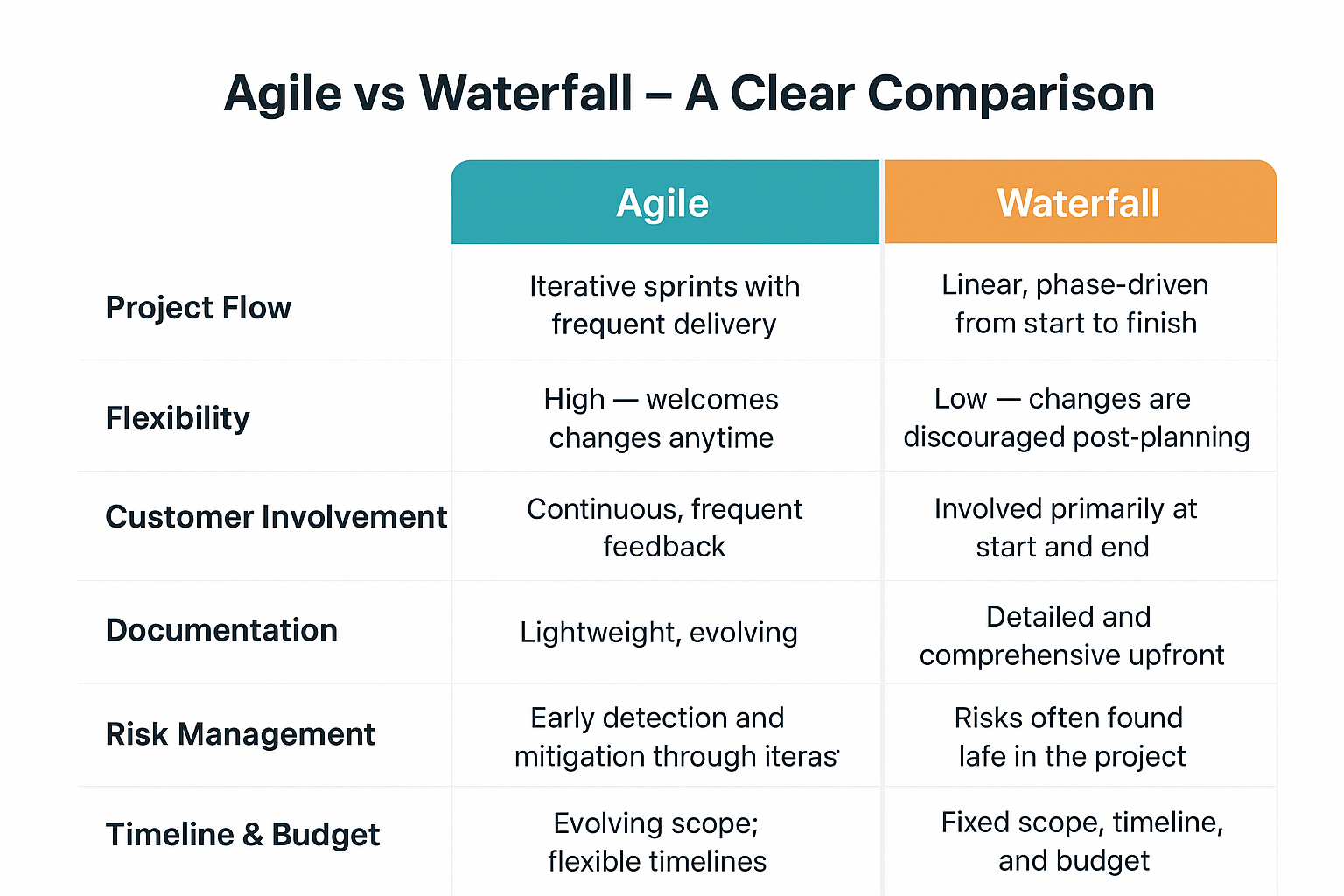
Salesforce Implementation Methodologies Compared: The Definitive Guide (2025)

one professional woman is discussing about salesforce implementation methodologies

Implementing Salesforce isn’t “one size fits all.” The right approach makes the difference between strategic transformation and frustrating setbacks.

Which Salesforce implementation methodology is best for your business—Agile, Waterfall, Hybrid, Big Bang, Phased, or Parallel? This guide puts every methodology side by side, hooks your attention with real-world scenarios, and answers the top Google FAQ, so you’ll stay on site and make your next CRM launch a standout success.

Why Choosing the Right Salesforce Methodology Is Critical

Woman in black suite explaining about Salesforce Implementation Methodologies

Here’s something most business leaders don’t hear enough: The way you implement Salesforce is as important as the software itself.

With CRM so deeply embedded in core business workflows, a bad rollout means missed ROI and tense teams. A great methodology aligns with organizational goals, timeline, budget, and stakeholders’ expectations.

Want a Salesforce launch that’s on-time, on-budget, and loved by users? Start by choosing the methodology with the best fit.

Overview: The Main Salesforce Implementation Methodologies


Salesforce projects commonly use six core methodologies:

  1. Agile

  2. Waterfall

  3. Hybrid

  4. Big Bang

  5. Phased

  6. Parallel

Let’s compare their differences, benefits, risks, and best-use scenarios—so you can pick wisely.

Agile Salesforce Implementation

What Is It?

Agile is an iterative framework: deliver working pieces quickly, get continual feedback, and adapt as the project unfolds. Teams work in “sprints,” usually 2-4 weeks, and reprioritize features based on stakeholder input

Advantages

  1. Fits ambiguous, evolving requirements.

  2. Speeds up value delivery thanks to quick iterations.

  3. Continuous stakeholder involvement builds buy-in and reduces surprises.

  4. Great for complex CRM customizations, innovation, and fast-changing markets.

Challenges

  1. Needs regular engagement from business users.

  2. Can feel chaotic if stakeholders expect clear blueprints.

  3. May extend timeline if scope is poorly managed.

If your business wants adaptability, innovation, and rapid feedback—Agile makes Salesforce implementation user-centric and future-proof.

Waterfall Salesforce Implementation

What Is It?

Waterfall is sequential—plan upfront, then design, build, test, and launch in a step-by-step order. Requirements are fixed before work begins.

Advantages

  1. Crystal clear requirements reduce mid-project changes.

  2. Predictable budgeting and timelines.

  3. Heavily documented, ideal for regulated industries (finance, healthcare).

Challenges

  1. Hard to adapt if goals change.

  2. Stakeholders only see the finished product at the end.

  3. Risk of rework if initial requirements miss the mark.

If your Salesforce rollout needs tight control, fixed scope, and zero surprises—Waterfall is the go-to for stability.

Hybrid Methodology

What Is It?

Hybrid blends Agile’s flexibility with Waterfall’s structure—formal upfront planning, with iterative development and phased releases.

Advantages

  1. Reduces risk and boosts adaptability.

  2. Facilitates cross-departmental collaboration, even if teams work differently.

  3. Good for projects with fixed elements but evolving features.

Challenges

  1. Balancing documentation and innovation can be tricky.

  2. Requires methodology-savvy partners and teams.

Hybrid lets you plan for the knowns… and adjust for the unknowns. It’s a popular choice for complex, fast-moving CRM projects.

Big Bang Implementation

What Is It?

All users and processes switch to Salesforce at once. Fast and bold—great for small or single-location companies.

Advantages

  1. Quick timeline and immediate benefits.

  2. Reduces legacy maintenance costs.

  3. Sharp focus, intense onboarding.

Challenges

  1. High risk of outages, user confusion, and data issues.

  2. Requires flawless testing and communication.

If you’re ready to go all-in with minimal disruption time, Big Bang implementation can turbocharge digital transformation.

Phased Implementation

What Is It?

Roll out Salesforce modules or user groups in stages—let small batches go live, learn, and test before scaling up.

Advantages

  1. Lowers risk with gradual adoption.

  2. Carefully manages change for larger teams.

  3. Allows course-correction mid-project.

Challenges

  1. Takes longer, costs more, requires managing hybrid environments.

  2. Integration issues can pop up until every phase is complete.

Phased rollout eases teams into Salesforce, minimizing stress and maximizing adoption.

Parallel Implementation

What Is It?

Old and new systems run side by side for a set time—users can switch between both until Salesforce proves ready.

Advantages

  1. Safest option, preserves business continuity.

  2. Easy rollback if issues arise.

  3. Lets large organizations vet data and workflows thoroughly.

Challenges

  1. Expensive, complex, and can be confusing for users.

  2. Requires ongoing legacy support.

Parallel implementation offers a fail-safe way to transition, favored by data-heavy, risk-averse enterprises.

At-a-Glance: Salesforce Implementation Comparison Table

Methodology Speed Adaptability Risk Best For
Agile Fast Very High Medium Innovation, evolving markets
Waterfall Predictable Low Medium Regulated, stable environments
Hybrid Moderate High Lower Mixed teams, enterprise
Big Bang Fast Low High Small businesses
Phased Slow Medium Low Large, multi-site organizations
Parallel Slow Medium Lowest Large-scale, safety-first

Which Approach Is Right for You?

Start with these questions:

  1. Do requirements need to be locked or likely to change?

  2. Is your business highly regulated?

  3. Are users and data spread across locations?

  4. How much downtime (if any) can your team tolerate?

  5. What’s your appetite for risk and innovation?

  6. Do you have enough resources for parallel or phased approaches?

The best methodology is the one tailored to your culture, goals, and risk profile—not just the vendor’s favorite!

Q 1: What is the difference between Agile and Waterfall for Salesforce projects?

Agile delivers fast, iterative releases with ongoing feedback. Waterfall provides a clear, well-documented process with requirements fixed up front.

Q 2: When should you choose phased vs. big bang implementation?

Phased works for large, multi-team businesses needing gradual change. Big Bang suits small teams wanting rapid deployment or minimal disruption.

Q 3: What are the benefits of a parallel Salesforce rollout?

Parallel rollout offers a safe transition by running both systems at once, reducing business risk and ensuring data integrity.

Q 4: Can Agile and Waterfall be combined in a Hybrid approach?

Yes—Hybrid implementation integrates fixed planning with iterative delivery, balancing structure and adaptability for complex Salesforce launches.

Real-World Success: Methodology in Action

  1. Empire State Building project (Waterfall): Sequential planning delivered under-budget success.

  2. Spotify’s digital teams (Agile): Fast iterative development enabled rapid product releases and evolution.

For Salesforce, many successful enterprise CRM launches use Hybrid or Phased approaches for scale and stability, while start-ups and SMBs lean on Agile or Big Bang for speed.

Final Takeaway

The methodology you choose drives everything—from user satisfaction to project cost and business impact. Compare options, balance your goals, and partner with Salesforce-certified experts to maximize your CRM investment.

Don’t gamble with your CRM launch—use this guide to pick the best-fit Salesforce implementation methodology and unlock ROI from day one.

Read moreSalesforce Implementation Case Studies for Retail -Success Stories & Lessons (2025)

Posted on Leave a comment

Salesforce Support and Maintenance Packages: Hassle-Free CRM Success (2025)

Salesforce support and maintenance packages

Have you ever wondered what keeps a powerful CRM like Salesforce running smoothly behind the scenes?

If you’re a business leader or Salesforce admin, you know that the real value comes from keeping your Salesforce instance healthy, secure, and always ready to evolve with your needs. 

Salesforce support and maintenance packages are your secret weapon—but what do they really include?

Let’s break down the must-know details and answer the questions most business owners have.

Why Smart Businesses Choose Salesforce Support Packages

Monitor is showing Salesforce support and maintenance packages

Ready for a truth bomb? Even the best CRM can become a pain point with neglect. Forgotten updates, slow performance, or mounting support tickets can quickly turn your digital powerhouse into a bottleneck.

Want your team to focus on growth instead of troubleshooting? That’s where a professional Salesforce support and maintenance package makes all the difference.

Imagine your Salesforce working like clockwork—always fast, secure, and customized—so your business never skips a beat.

What’s Inside a Salesforce Support & Maintenance Package?

Most reputable Salesforce support partners (including Salesforce itself) offer layered packages. Look for these key inclusions:

Essential Services Most Packages Provide

  1. 24/7 Help Desk & Ticket Resolution: Quick fixes when issues arise—even after hours.

  2. System Monitoring: Real-time tracking for outages, errors, and performance issues.

  3. Security & Compliance: Regular audits, security patching, and compliance checks—no more worrying about GDPR or data breaches.

  4. Bug Fixes & Troubleshooting: Proactive identification and resolution, not just waiting for you to report issues.

  5. User Support & Training: Role management, permissions, onboarding, and hands-on Q&A for end-users and admins.

  6. Customization & Configuration: Tailoring workflows, dashboards, and automations to your team’s evolving needs.

  7. Data Management: Cleansing, backups, migrations, and overall stewardship of your most critical asset—your data.

  8. App & Integration Support: Ensuring seamless integration with third-party tools, APIs, or internal systems.

Ask yourself—how much time is your admin team spending on manual fixes each week? With support, that time goes right back into business innovation.

Types of Salesforce Support & Maintenance Packages

Salesforce support isn’t one-size-fits-all. Let’s compare common approaches:

1. Standard/Basic Packages

  1. Core help desk support during business hours (usually 9-5).

  2. SLA-based ticket resolution (often within 8 hours).

  3. Weekly health reports and minor fixes.

2. Advanced/Pro Packages

  1. 24/7 emergency support and monitoring.

  2. Proactive performance optimization and predictive trouble-shooting.

  3. Inclusion of security audits and regular health checks.

  4. Custom development (for triggers, Lightning Components, and custom apps).

3. Premium/Transform Packages

  1. Dedicated Customer Success Managers.

  2. Custom training sessions.

  3. Priority response times and escalations.

  4. Support for complex integrations and automation (Flows, APIs).

  5. AppExchange management—install, test, and optimize third-party apps.

Do you want hands-on, anytime support or just “fix it when broken”? Your choice impacts uptime, employee workflow, and customer satisfaction.

Salesforce Pricing: What Should Businesses Expect?

Support and maintenance pricing varies based on business size, coverage hours, package complexity, and add-ons.

  1. Entry-level support: Typically starts from $25–$40 per user/month for standard help desk and administration.

  2. Hourly support blocks: Packages such as 8, 20, 40, or 80 hours/month (ranging from $1,200 to nearly $10,000 for major projects or enterprises).

  3. Enterprise-level plans: Expansive coverage (including integrations and development) can reach upwards of $20,000+ depending on scope and response time guarantees.

Tip: Always compare inclusions, not just price. Some vendors offer unused hour carryover, multi-channel support, or flexible contracts (three months minimum is common).

Key Benefits of Salesforce Support Packages

Monitor is showing Salesforce support and maintenance packages

Why invest in a formal support plan? Here’s what the top-performing organizations enjoy:

  1. Minimized Downtime: Problems get solved fast, users stay productive.

  2. Optimal Performance: Regular health checks keep Salesforce running at peak speed.

  3. Security Peace of Mind: Ongoing monitoring catches vulnerabilities before they become breaches.

  4. Better User Adoption: Custom training helps teams stay up-to-date and confident.

  5. Cost-Efficiency: Outsource support to experts—no need for expensive full-time hires.

  6. Scalability: As your business grows, your support scales with you.

Wouldn’t it be nice to never worry about Salesforce updates, bugs, or forgotten backups again? That’s the package advantage.

What to Consider When Choosing a Salesforce Support Package

Ready to invest? Make sure these factors are top-of-mind:

  1. Package scope: Do you need just admin support, or custom development and integration?

  2. Coverage hours: Is 24/7 support necessary for your region and time zone?

  3. Responsiveness: Look at SLA times—does 8 hours feel right, or do you want 2-hour urgent coverage?

  4. Training and onboarding: Will your users get a tailored learning experience?

  5. Compliance and security: Especially critical for regulated industries (healthcare, finance, etc.).

  6. Reviews and certifications: Always vet for Salesforce-certified partners.

The right partner doesn’t just keep Salesforce online—they make it a force multiplier for your business growth.

1. What do Salesforce support and maintenance packages include?

Typical coverage spans customer help desk, bug fixes, role management, security audits, data management, customization, and performance optimization.

2. How is Salesforce support priced?

Packages can be monthly per-user, blocks of hours per month, or full enterprise contracts. Entry-level plans often start around $25–$40/user/month.

3. Is 24/7 support available in all packages?

No—24/7 coverage is standard in advanced and premium packages, while basic support is often restricted to business hours.

4. What’s the difference between admin support and custom development?

Admin support focuses on daily usage issues; custom development covers deeper workflow changes, customizations, and integrations.

5. Why outsource Salesforce support?

Outsourcing maximizes ROI, unlocks expert resources, improves uptime, and is often more cost-effective than recruiting in-house admins.

How Real Companies Thrive With Salesforce Support

Case studies show that organizations implementing Salesforce support plans:

  1. Cut support resolution times by up to 50%.

  2. Improve user adoption rates and reduce ticket backlogs.

  3. Prevent critical downtime and maximize growth when scaling.

Success is not just about software—it’s about expertise and partnership.

Final Takeaway

Choosing the right Salesforce support and maintenance package is the single best way to protect your CRM investment, boost team productivity, and future-proof your business. Whether you’re a startup with a handful of licenses or a global enterprise juggling compliance needs, a well-defined support plan means your Salesforce will always be secure, high-performing, and ready for what’s next.

Ready to never worry about your Salesforce CRM again? Explore support packages and start turning headaches into high-fives—every month.

Read moreSalesforce Implementation Cost Breakdown Explanation (2025)

Posted on Leave a comment

Salesforce Implementation Case Studies for Retail -Success Stories & Lessons (2025)

Salesforce Implementation Case Studies for Retail

Salesforce implementation in retail has powerfully transformed how businesses manage their operations, customer relationships, and growth strategy.

Retailers now compete by offering seamless, data-driven experiences—often enabled by robust case studies that prove the difference Salesforce can make.

This blog dives deeply into real scenarios, showing how retail leaders leveraged Salesforce to unify data, automate workflows, and engage customers on new levels.

Introduction: Why Salesforce in Retail Matters

Salesforce Implementation Case Studies for Retail

Salesforce is more than just a CRM—it’s the beating heart of modern retail operations. Today, winning in retail means knowing your customers, predicting their needs, and delivering beyond expectations.

Salesforce helps retailers achieve these goals by combining data analytics, automation, and omnichannel communication in one platform.

How Do Retailers Use Salesforce?

Retailers use Salesforce to:

  1. Integrate store and online data

  2. Automate repetitive sales and support tasks

  3. Empower staff to focus on growth-oriented work

  4. Personalize customer experiences

  5. Improve inventory and order management

  6. Innovate fast, even in complex markets

Let’s explore case studies to see this in action.

Case Study #1: Hardware Retailer Unified Operations

Salesforce Implementation Case Studies for Retail

A leading hardware retailer in the U.S. was struggling with fragmented processes. Customer info, orders, and communications lived in separate systems. Staff lost time on manual data entry, inefficient sales tracking, and delayed customer service.

The Challenge

  1. Scattered customer/contact data

  2. Manual order follow-ups and support

  3. Lost sales due to slow web lead response

The Solution

United Techno integrated Salesforce with back-end systems. Key steps:

  1. Partner API Integration: Sync orders and inventory in real time

  2. Phone System Connection: Automatic call logging and accessible customer info

  3. Email Automation: Auto-creation of support cases from emails and faster web lead routing

  4. Chatbot Development: Real-time customer engagement for instant help

  5. Einstein Activity Capture: Streamline email/calendar sync, boosting productivity

  6. Salesforce Flow Automation: Standardize quote follow-ups and notifications

The Results

  1. Centralized data and efficiency

  2. Automated manual tasks, freeing up staff

  3. Strong CRM platform supporting rapid growth

  4. Improved customer engagement with multi-channel support

Case Study #2: European Discount Retail Chain

A major discount retailer across the EU and USA struggled to support its loyalty card integration and growing self-service needs while managing regulatory and scalability challenges.

The Challenge

  1. Legacy systems couldn’t scale or integrate

  2. Loyalty card and broader program lacked CRM connections

  3. Exploding number of support cases

The Solution

Salesforce and Persistent rolled out:

  1. Service Cloud and Marketing Cloud: For unified customer views and enhanced case routing

  2. Community Cloud: Self-service portal for faster problem resolution

  3. GDPR Compliance: Built-in anonymization and privacy tools

  4. Store Locator: Integrated for customer ease

The Results

  1. Tight integration between loyalty programs and service

  2. Faster support, more transparent management

  3. Scalability for international growth

Case Study #3: Online Furniture Retailer

A top furniture retailer in India wanted to automate its sales and service workflows after expanding across multiple cities. Previous CRM efforts were riddled with user assignment glitches and inefficient escalation.

The Challenge

  1. Overburdened order management

  2. Workflow inefficiencies and errors

  3. Uncoordinated customer case allocation

The Solution

Daffodil Software led a custom implementation:

  1. Improved order capacity and error handling

  2. Automated customer case resolution and escalation

  3. Comprehensive reporting and tracking

  4. Simple integration with external systems for scaling up

The Results

  1. 20%+ order management capacity increase

  2. 30% workflow efficiency boost

  3. 15% drop in order errors

Common Themes in Retail Salesforce Success Unifying Data

Retailers used Salesforce to create a single source of truth for customer interactions and business operations, eliminating silos and guesswork.

Automating Workflows

Manual work is replaced with cloud-powered automation:

  1. Case and ticket creation

  2. Lead nurturing and follow-up

  3. Inventory and order tracking

  4. Marketing campaign management

Personalizing Customer Experience

Retailers leverage purchase histories, loyalty data, reviews, and omnichannel profiles to make every shopper feel understood. AI-driven tools like chatbots and product recommendation engines further personalize the journey.

Scaling for Growth

Salesforce’s flexibility lets retailers expand internationally, manage more stores, and innovate with features like endless aisle, loyalty app integration, and GDPR-safe data handling.

Benefits Retailers Achieve with Salesforce

  1. Efficiency: Streamline day-to-day tasks, reduce error rates, and improve speed to market.

  2. Customer Loyalty: Support personalized journeys, loyalty programs, and omnichannel service.

  3. Productivity: Staff spend less time chasing data and more time building the business.

  4. Data-Driven Decisions: Get insights in real time; tweak assortments, marketing, and service instantly.

The Future of Retail with Salesforce

Retailers are embracing AI, automation, mobile, and voice tools to stay ahead. Salesforce’s ecosystem allows rapid launching of new loyalty campaigns, instant support experiences, and better predictive stocking, helping retailers adapt to change and win customer trust.

Final Takeaway

Salesforce implementation case studies for retail prove the power of data-driven, automated, and customer-focused transformation. Hardware stores, discounters, and online furniture giants all see measurable results: higher efficiency, smarter growth, and delighted customers. For retail leaders, the future means deeper integration, smarter automation, and relentless innovation—with Salesforce at the center.


Read Related : Custom Salesforce Solutions for Retail Businesses: Omnichannel Retail Success! [2025]

Posted on Leave a comment

How Salesforce Einstein Analytics Consultants Drive Business Growth (2025)

Salesforce Einstein Analytics Consultants

In today’s fast-paced digital world, every click, call, and customer interaction generates valuable data. For businesses, the challenge isn’t collecting data—it’s turning that data into actionable insights. That’s where Salesforce Einstein Analytics consultants come into the picture.

These specialized experts help organizations unlock the full potential of Salesforce Einstein Analytics (now called Tableau CRM). If you’re wondering who they are, what they do, and whether your business needs one, this complete guide will walk you through everything you need to know.

What Is Salesforce Einstein Analytics?

Before diving into the role of consultants, let’s quickly recap Einstein Analytics.

Salesforce Einstein Analytics is an AI-powered analytics platform that transforms business data into actionable insights. It:

  1. Integrates seamlessly with Salesforce CRM.

  2. Uses AI and machine learning to predict outcomes.

  3. Provides interactive dashboards for visualization.

  4. Offers prescriptive recommendations to guide next steps.

  5. Helps teams move from reactive reporting to proactive decision-making.

But here’s the key—Einstein Analytics is powerful, and powerful tools often require skilled hands. That’s where consultants step in.

Who Are Salesforce Einstein Analytics Consultants?

One Salesforce Einstein Analytics Consultants explaining about analytics

Einstein Analytics consultants are certified Salesforce professionals trained in setting up, customizing, and managing the platform. They have both technical knowledge of Salesforce and strategic expertise in analytics.

Think of them as your data translators, strategists, and solution builders combined into one. Their job is to make sure your business gets maximum value from Einstein Analytics while aligning it with your workflows and goals.

Why Businesses Need Einstein Analytics Consultants

Even though Einstein Analytics is user-friendly, implementing it effectively across an organization isn’t simple. Here’s why businesses turn to consultants:

  1. Customization: Out-of-the-box dashboards don’t always fit every business. Consultants tailor analytics to your KPIs.

  2. Integration: They connect Salesforce with external systems like ERP, marketing tools, and third-party apps.

  3. Data Quality: Consultants ensure clean and accurate data—because flawed inputs lead to flawed insights.

  4. Governance: They help establish proper data security, permissions, and governance frameworks.

  5. Scalability: Consultants design analytics that can grow with your business’s future needs.

  6. Training: Teams don’t just need dashboards; they need to know how to use them effectively. Consultants provide workshops and training.

Key Responsibilities of a Salesforce Einstein Analytics Consultant

Here’s what consultants typically do when brought into a business project:

  1. Requirement Analysis: Identify business needs, KPIs, and goals for analytics.

  2. Solution Design: Map out dashboards, data pipelines, and AI models for reporting.

  3. Implementation: Set up Einstein Analytics inside Salesforce, integrate external data sources, and optimize data flows.

  4. Customization: Develop tailored dashboards and widgets specific to each team (sales, service, marketing).

  5. AI Model Training: Configure predictive models to score leads, forecast sales, or detect patterns.

  6. Testing & Validation: Ensure data integrity and accuracy of dashboards.

  7. Training & Handover: Empower business users to leverage analytics confidently.

  8. Ongoing Support: Provide long-term maintenance, optimizations, and upgrades.

What Skills Do Salesforce Einstein Analytics Consultants Have?

Einstein Analytics consultants are a blend of technical and business expertise. Typical skills include:

  1. Proficiency in Salesforce CRM ecosystem (Sales Cloud, Service Cloud, Marketing Cloud).

  2. Knowledge of ETL processes for extracting, transforming, and loading data.

  3. Expertise in data modeling and visualization.

  4. Strong knowledge of machine learning concepts as applied in Salesforce.

  5. Hands-on with Einstein Discovery (predictive analytics).

  6. Understanding of data governance and security best practices.

  7. Communication and teaching skills to train non-technical users.

Most importantly, they’re certified professionals with official Salesforce credentials: Tableau CRM and Einstein Discovery Consultant Certification.

Benefits of Hiring Salesforce Einstein Analytics Consultants

Hiring a consultant can be a game-changer. Here are the biggest benefits:

  1. Maximizing ROI on Salesforce: You’ve already invested in Salesforce CRM. Consultants ensure you get the most out of Einstein Analytics.

  2. Smarter Sales: Consultants set up predictive lead scoring, helping sales teams focus on high-conversion opportunities.

  3. Optimized Marketing: They help marketers analyze campaign performance and customer behavior.

  4. Better Customer Service: Analytics can predict case escalations and improve service team efficiency.

  5. Faster Decision-Making: Custom dashboards deliver instant visibility tailored to your business goals.

  6. Competitive Advantage: AI-driven insights give you an edge over competitors relying on traditional reports.

Use Cases Where Consultants Are Indispensable

For Sales Teams

  1. Creating dashboards that show pipeline health.

  2. Predicting which leads are most likely to convert.

  3. Forecasting monthly or quarterly revenue.

For Marketing Teams

  1. Tracking campaign ROI in real time.

  2. Segmenting customer profiles for personalization.

  3. Identifying which channels drive the highest engagement.

For Service Teams

  1. Monitoring case resolution times.

  2. Predicting and preventing churn.

  3. Identifying recurring customer pain points.

For Executives

  1. Providing a 360-degree view of the business.

  2. spotting market trends before competitors.

  3. Aligning strategy based on accurate predictive models.

When Should You Hire a Salesforce Einstein Analytics Consultant?

You should consider hiring one if:

  1. You’ve recently invested in Salesforce Einstein Analytics but aren’t using it to its full capacity.

  2. Your team struggles with data silos across systems.

  3. You want to move beyond basic Salesforce reporting.

  4. You’re looking to adopt predictive analytics but lack in-house expertise.

  5. Your executive team needs insights for strategic decisions.

How to Choose the Right Consultant

Not all consultants are created equal. Here’s what to look for when selecting the right expert:

  1. Salesforce Certification: Ensure they hold the Tableau CRM and Einstein Discovery Consultant certification.

  2. Industry Experience: Pick consultants with experience in your sector (retail, finance, healthcare, manufacturing, SaaS).

  3. Proven Track Record: Look for case studies or references from clients.

  4. Customization Skills: Can they tailor analytics to your business?

  5. Training Approach: Do they provide ongoing training and support?

  6. Scalable Solutions: A good consultant designs analytics that grow as your business grows.

The Future of Salesforce Einstein Analytics Consulting

With the rise of AI, the future of Einstein Analytics consulting looks bright. Consultants will play an even bigger role in:

  1. Implementing self-learning AI models for deeper business foresight.

  2. Designing voice-activated dashboards for instant insights.

  3. Providing cross-platform analytics, bridging Salesforce with ERP and IoT data.

  4. Helping organizations build a data culture, where every team makes decisions based on AI-powered insights.

Final Takeaway

Salesforce Einstein Analytics is one of the most powerful tools businesses can leverage today—but its success depends on how well it’s implemented and optimized. Salesforce Einstein Analytics consultants bring the perfect blend of technical expertise and strategic thinking to ensure your Salesforce investment drives measurable results.

Whether it’s aligning dashboards to business KPIs, cleaning and integrating data, or enabling AI-driven predictions, consultants make sure you don’t just collect data—you act on it.

Investing in the right consultant isn’t just about technology. It’s about empowering your teams, making smarter decisions, and staying ahead in a competitive, data-driven world.

Read moreSalesforce Implementation Cost Breakdown Explanation (2025)

Posted on Leave a comment

How Does Salesforce Einstein Analytics Work? A Complete Guide (2025)

Professional woman in black suite showing salesforce Einstein Dashboard and having folded hands and smiling

In today’s data-driven world, businesses that can unlock insights from their data have a clear advantage.

Salesforce Einstein Analytics, now known as Tableau CRM, is one of the most powerful tools available to help businesses do just that.

But if you’re new to Salesforce or analytics in general, you might be wondering: How does Salesforce Einstein Analytics actually work?

This guide will break it all down in simple terms. By the end, you’ll clearly understand what Salesforce Einstein Analytics does, how it works, and why it matters for businesses of all sizes.

What Is Salesforce Einstein Analytics?

Salesforce Einstein Analytics and its mascot

Salesforce Einstein Analytics (rebranded as Tableau CRM) is an advanced analytics and business intelligence solution built directly into Salesforce.

Think of it as your own data-driven assistant that doesn’t just give you reports but also predicts future outcomes, spots hidden patterns, and recommends the next best steps.

Unlike basic reporting tools, Einstein Analytics empowers you to:

  1. Gather and combine data from multiple sources (Salesforce and beyond).

  2. Visualize data through intuitive dashboards.

  3. Use AI-powered insights for smarter decision-making.

  4. Empower sales, marketing, and service teams with predictive recommendations.

Put simply, it transforms raw business data into actionable insights that help you move from reactive to proactive.

Why Businesses Use Einstein Analytics

Before we dive into how it all works, let’s look at why so many companies trust this tool.

  1. Seamless integration with Salesforce: Since it’s native to Salesforce, your CRM data flows instantly without manual exports.

  2. AI-based predictions: It doesn’t just show what happened but tells you what will likely happen next.

  3. Custom dashboards: Every team can design dashboards tailored to their unique KPIs.

  4. Actionable insights: Recommendations are directly tied to Salesforce actions, meaning you can take the next step right then and there.

  5. Scalability: Whether small startup or global enterprise, it scales with your business needs.

Now that we’ve covered the why, let’s explore the how.

How Does Salesforce Einstein Analytics Work?

The way Einstein Analytics works can be broken down into a structured flow: Data → Analysis → Insights → Actions.

Step 1: Data Collection

Einstein Analytics gathers data from multiple sources, such as:

  1. Salesforce CRM (Sales Cloud, Service Cloud, Marketing Cloud, etc.)

  2. External systems (ERP, databases, spreadsheets, APIs)

  3. Third-party apps and cloud services

This flexibility ensures you have a 360-degree view of your business data – not just Salesforce records.

Step 2: Data Preparation (ETL)

Once data is pulled in, Einstein automatically performs ETL processes (Extract, Transform, Load) to prepare it. This involves:

  1. Cleaning: Removing duplicates and errors.

  2. Transforming: Converting raw numbers into structured fields.

  3. Integrating: Combining different datasets into one unified format.

This step is critical because clean, unified data = more accurate insights.

Step 3: AI-Powered Analysis

This is where the real magic happens. Leveraging artificial intelligence (the Einstein AI engine), the tool analyzes datasets using techniques like:

  1. Machine learning: Predicting customer behavior (e.g., likelihood to convert or churn).

  2. Pattern recognition: Spotting sales trends, seasonal demand surges, or service bottlenecks.

  3. Natural language processing (NLP): Letting users ask questions in simple English (e.g., “Which region had the highest sales last quarter?”)

Essentially, it does the heavy lifting so users don’t need to be data scientists.

Step 4: Visualization and Dashboards

Einstein Analytics translates all this analysis into interactive dashboards.

  1. Sales teams can view pipeline performance.

  2. Marketing can see campaign ROI and customer engagement.

  3. Service teams can check resolution times and satisfaction scores.

Dashboards are not just static charts—they are fully interactive, meaning you can drill down into data for deeper insights.

Step 5: Predictive & Prescriptive Insights

Beyond showing past and current performance, Einstein Analytics provides:

  1. Predictive analytics: Forecasting sales, customer churn, or demand.

  2. Prescriptive analytics: Recommendations on the best action to take next (e.g., upsell opportunity, personalized offer, faster service resolution).

These insights help businesses shift from hindsight to foresight.

Step 6: Taking Action in Salesforce

Here’s where Einstein Analytics truly stands out. Instead of copying insights into another system, you can take direct action inside Salesforce. For example:

  1. A sales manager might spot a deal at risk and reassign it to a senior rep.

  2. A marketing team could automatically adjust spend on high-performing ads.

  3. A service agent could receive alerts to prioritize escalated cases.

It turns insights into execution seamlessly.

Key Features of Salesforce Einstein Analytics

Salesforce Einstein Analytics and its mascot 2

Here are some standout features making Einstein Analytics indispensable:

  1. AI Predictions: Score leads, predict revenue, and forecast trends.

  2. Natural Language Queries: Ask, “Show me revenue by product for Q3,” and get answers instantly.

  3. Advanced Segmentation: Drill into customer groups by geography, behavior, or value.

  4. Mobile-Ready: Access dashboards anytime, anywhere.

  5. Pre-Built Templates: Quickly launch analytics with out-of-the-box apps for sales, service, and marketing.

Real-World Examples of Einstein Analytics in Action

To make things more concrete, let’s look at examples of how businesses use it every day:

  1. Retail: Predict product demand, optimize inventory, and prevent stockouts.

  2. Healthcare: Forecast patient loads, track treatment outcomes, and improve patient engagement.

  3. Financial Services: Detect fraud, predict loan defaults, and personalize client offers.

  4. SaaS Companies: Spot churn risks, optimize renewals, and upsell at just the right moment.

Benefits of Salesforce Einstein Analytics

The benefits extend across all teams in an organization.

  1. Sales: Prioritize leads that are most likely to convert.

  2. Marketing: Measure real-time ROI and optimize campaigns.

  3. Service: Deliver proactive support and reduce case resolution time.

  4. Executives: Gain a holistic view for strategic decisions.

In short, it empowers every department with smarter, faster, and better decision-making.

Challenges to Keep in Mind

Like any powerful tool, Einstein Analytics also comes with considerations:

  1. Learning curve: New users may need training on dashboards and reports.

  2. Data quality: Poor data will result in poor insights (garbage in = garbage out).

  3. Cost factor: Advanced features and scaling can increase investment.

The good news? Salesforce provides extensive training resources and a strong support ecosystem to overcome these hurdles.

Future of Salesforce Einstein Analytics

As Salesforce continues to evolve, expect Einstein Analytics to get even more intuitive, predictive, and user-friendly. Integration with AI models, automation capabilities, and deep industry-specific solutions will continue to grow.

Its future lies in:

  1. Stronger AI automation (less manual setup).

  2. Deeper integration with Tableau for advanced visualizations.

  3. Voice-driven insights, allowing managers to ask questions on the go.

Final Takeaway

So, how does Salesforce Einstein Analytics work? It works by connecting all your data sources, preparing and analyzing them using advanced AI, visualizing insights in powerful dashboards, and enabling real-time business actions—all inside the Salesforce ecosystem.

Businesses that adopt it are better positioned to predict trends, improve efficiency, and make data-driven decisions faster than ever before.

Read moreSalesforce CRM Customization and Implementation Services that 10X Your Revenue (2025)

Posted on Leave a comment

The Ultimate Service Cloud setup guide for nonprofits (2025)

Professional team is talking about service cloud setup for non profits

Setting up Salesforce Service Cloud for a nonprofit isn’t a matter of simply turning on features and hoping for the best.

Even with Salesforce’s powerful technology, configuring Service Cloud so it fits your team, programs, and mission can require weeks or even months of careful effort—mapping nonprofit workflows, migrating legacy data, and building support processes to deliver impact.

But after Service Cloud goes live, how can you be sure it’s empowering your staff, volunteers, and constituents? Nonprofits need a setup that’s frictionless, scalable, and actually works for social good—helping you build relationships, answer requests in real time, raise satisfaction, and show funders your impact.

Salesforce Service Cloud offers a flexible, nonprofit-friendly platform to help you get there.

With the right approach, your nonprofit can start realizing Service Cloud’s value in a matter of days—tracking every case and request, automating outreach, and giving your staff powerful tools for positive change.

We believe that once you follow these expert steps, Service Cloud can transform how you engage supporters, track programs, and amplify your mission.

This Service Cloud setup guide for nonprofits explains the 10 critical steps every nonprofit should follow for Service Cloud setup, from the first strategy session to long-term impact.

10. Build Your Core Project Team

Team is discussing on Service Cloud setup guide for nonprofits

Every successful Service Cloud project starts with collaboration. Gather key players from leadership, programs, IT, and development before you touch a single setting. Assign clear roles—champion, technical lead, admin and end-user tester.

  1. Include champions and end users for strong buy-in.

  2. Define responsibilities and create a project communication plan.

  3. Set a realistic go-live timeline to avoid burnout and confusion.

The right team culture is as important as the right technology.

9. Clarify Nonprofit Goals & Processes

Service Cloud setup must align to your specific objectives:

  1. Are you focused on support ticketing for beneficiaries, donor service, volunteer management, helpline calls, or grant questions?

  2. Map current journeys for staff and stakeholders—where are service gaps or bottlenecks?

By mapping these needs, Service Cloud can be tailored for your real-world impact.

8. Choose the Best Service Cloud Features

Salesforce offers a spectrum of tools. Nonprofits should tailor key features for their mission:

  1. Case Management for tracking support requests

  2. Knowledge Base for FAQs, guides, and self-service

  3. Omnichannel Routing for email, web, and chat

  4. Automated Workflows to route, acknowledge, and escalate requests

Don’t turn everything on at once. Start with essentials and scale features as adoption grows.

7. Design Support Flows & Automations

Configuring Service Cloud isn’t just building cases—it means designing logical flows that serve both people and your mission:

  1. Use record types to differentiate support, volunteer, donation, and program requests.

  2. Set up automations for ticket assignments, email updates, and escalation.

  3. Create macros for repetitive responses that can save staff hours each month.

Automation ensures prompt, reliable service with limited nonprofit resources.

6. Integrate with Nonprofit Success Pack (NPSP)

Most nonprofits rely on NPSP for fundraising, donor management, and reporting. Ensure Service Cloud links seamlessly to NPSP objects:

  1. Set up lookup relationships between cases and contacts, households, organizations, or programs.

  2. Automate status updates for program staff when cases or requests are completed.

  3. Use NPSP reports to show the full lifecycle—from service intake to impact outcome.

This integration brings all your supporter data together in one place.

5. Plan Data Migration & Clean-Up

Bringing support cases, legacy emails, donor issues, and call records into Service Cloud is key, but it needs to be done right:

  1. Cleanse and map old records to new Service Cloud objects and fields.

  2. Validate data post-migration to ensure nothing important is lost.

  3. Archive or secure sensitive data in line with compliance requirements.

A clean foundation enables accurate service tracking going forward.

4. Test with Real Scenarios

Before go-live, test every setup through real family, donor, or program scenarios. Get feedback from the people who will use the platform every day:

  1. Run simulated cases for common situations: donor inquiries, volunteer help, beneficiary support.

  2. Test new workflows, automations, and escalations.

  3. Make adjustments before staff and stakeholders log in the first time.

Testing guarantees a smoother transition and happier users.

3. Engage & Train Your Team

Nonprofit teams must be empowered, not intimidated by Service Cloud.

  1. Provide role-based, task-focused training sessions for staff, volunteers, and leadership.

  2. Build “super users” or champions who support ongoing learning.

  3. Offer guided onboarding and clear help resources right in Salesforce.

Training ensures adoption and maximizes your software investment.

2. Monitor Adoption & Use Data for Improvement

After launch, actively review how Service Cloud is working for your team:

  1. Use dashboards to watch open vs. closed cases, escalation rates, and satisfaction scores.

  2. Gather frontline feedback—what’s working, what’s confusing, what needs changing?

  3. Schedule quarterly reviews to improve case processes and community outcomes.

Analytics turn your CRM into a tool for strategic change.

1. Share Impact & Scale for Growth

The true power of Service Cloud is in measuring impact and scaling good work:

  1. Use reports to communicate how your staff helps more people, closes more cases, or delivers faster aid.

  2. Integrate impact dashboards and data visuals for executives, funders, and your board.

  3. As your nonprofit grows, Service Cloud grows with you—add more programs, channels, and community tools over time.

Making impact visible keeps donors engaged and mission momentum strong.

Final Thoughts

Setting up Salesforce Service Cloud for your nonprofit isn’t just about technology—it’s about people, process, and measurable outcomes. When setup is intentional, collaborative, and scalable, you’ll empower frontline staff, engage your supporters, and make every service request another opportunity for mission-driven impact.

Unlock Service Cloud’s potential and let your nonprofit do more good with less effort—this isn’t just setup, it’s transformation for your cause.


Read moreThe Benefits of Salesforce Service Cloud for Customer Service (2025)

Posted on Leave a comment

Salesforce Implementation Cost Breakdown Explanation (2025)

Professional man wearing suite giving Salesforce Implementation Cost Breakdown Explanation

Implementing Salesforce is a big step for any organization. This is true whether you’re a small business adopting CRM for the first time or a global enterprise replacing legacy systems with Salesforce’s ecosystem.

No matter what stage you’re in, one thing always rises to the top of the conversation—costs. You can spend weeks or months mapping business processes, customizing workflows, and aligning stakeholders to Salesforce, only to realize that your budget and actual expenses don’t always match.

But how can you be sure you understand the real cost of Salesforce implementation? Whether your goal is maximizing ROI, scaling faster, or simply budgeting more accurately, it’s important to break down each cost component clearly.

That way, you won’t be caught off guard by hidden fees. Instead, you’ll enjoy a smooth implementation that delivers on both functionality and financial expectations.

Salesforce is known for being one of the most flexible and powerful platforms available. But with power comes complexity—and with complexity, variation in pricing.

The good news: once you understand how the cost structure works, you’ll be empowered to make smarter business decisions, avoid unnecessary expenses, and get the maximum value out of your Salesforce deal.

We’ve written this blog post to give you 10 key breakdowns that explain Salesforce implementation costs and what drives them.

Cost Component Description Typical Cost Range Notes
Salesforce Licensing Fees User licenses needed to access Salesforce $25 to $300 per user per month Depends on edition (Essentials to Unlimited) and user count
Implementation Partner/Consultant Fees External expertise for setup and customization $100 to $250 per hour Small projects: $10K-$25K; large enterprise: $100K+
Customization & Development Custom objects, workflows, Apex code, Lightning components $10,000 to $85,000+ Greater complexity and custom solutions increase costs
Data Migration Cleaning, mapping, and importing data $5,000 to $60,000+ Depends on data volume, quality, and sources
System Integration Connecting Salesforce to ERP, marketing, other systems $0 (simple) to $100,000+ Simple integrations can be free; complex ERP or API integrations increase costs
User Training & Change Management Training programs, workshops, adoption efforts $500 to $5,000 per user or more Critical for adoption; comprehensive programs raise costs
Ongoing Support & Maintenance Administrator salaries or managed service fees $2,000 to $5,000 per month / $70K-$120K annually Needed post go-live for maintenance and support
AppExchange Add-Ons Third-party apps for extended functionality Varies; often per user per month Can add significant recurring costs
Project Timeline & Complexity Duration and scope affect total consulting and implementation hours 4-6 weeks (small) to 12-18 months (large) Longer timelines increase consulting and internal costs
Industry-Specific Needs Compliance and specialized configurations Variable; can be costly Healthcare, finance, manufacturing often have higher costs due to regulations

10. Salesforce Licensing Fees

man in suite giving Salesforce Implementation Cost Breakdown Explanation to client

At the foundation of every Salesforce implementation are licensing costs. Salesforce licenses come in several editions—Essentials, Professional, Enterprise, and Unlimited. Each edition unlocks different features and pricing tiers.

  1. Essentials may cost around $25/user/month while

  2. Enterprise or Unlimited can stretch to $150–$300/user/month.

The license level you select directly drives both upfront and ongoing costs. Be sure to measure license choice against actual needs. Many companies overspend by buying advanced tiers that go unused.

9. Implementation Partner or Consultant Fees

In most cases, a Salesforce implementation partner or consultant helps deploy Salesforce successfully. Experienced partners bring both technical skills and business process expertise.

  1. Partner rates can range anywhere from $100–$250/hour depending on region and specialization.

  2. A small project may require $10K–$25K in services, while enterprise implementations often reach well into six figures.

This is often one of the largest cost drivers but also the most valuable, ensuring your system is configured for success.

8. Customization and Development Costs

No two Salesforce orgs look exactly alike. Organizations almost always need custom objects, workflows, triggers, Apex code, or Lightning components.

  1. Simple “out of the box” configurations may cost very little.

  2. Custom development, on the other hand, can add weeks of effort and tens of thousands of dollars.

Ask yourself: Do I need a custom feature or does Salesforce already offer a standard tool that meets most needs? Keeping customization lean keeps costs down.

7. Data Migration

Bringing over your data from legacy systems adds both time and cost. It’s not just about exporting and importing—it’s about cleaning, mapping, and verifying.

  1. Migration costs depend on the size, structure, and quality of existing data.

  2. Bad data (duplicates, missing fields) requires extra cleaning, raising costs.

A small business may spend $5K–$10K on migration, while large enterprises could spend $50K+ if multiple systems and millions of records are involved.

6. Integration with Other Systems

Salesforce rarely lives in isolation. You’ll likely want it connected to systems such as ERP, marketing automation, or customer support tools.

  1. Simple integrations (e.g., Salesforce + Google Workspace) may be free or low-cost.

  2. Complex ERP integrations or custom APIs can run $20K–$100K depending on scope.

The deeper your tech stack integration needs, the higher the cost of Salesforce implementation.

5. User Training and Change Management

Even the best system fails without adoption. Training end users is a critical investment.

  1. Basic training might be included with your partner’s implementation package.

  2. Comprehensive programs with workshops, e-learning, and ongoing support can cost thousands more.

Change management—communication plans, leadership alignment, and adoption monitoring—also adds to the budget but prevents project failure in the long run.

4. Ongoing Support and Maintenance

Implementation costs don’t end at go-live. You need admins, support teams, and maybe even part-time consultants to maintain the org.

  1. An in-house Salesforce Administrator salary may range $70K–$120K per year.

  2. Managed services from partners could run $2K–$5K/month depending on service scope.

Factor this into your budget early so you don’t underestimate the ongoing costs of ownership.

3. AppExchange Add-Ons and Third-Party Tools

Salesforce has thousands of pre-built apps on the AppExchange. Many organizations rely on these for functionality such as document generation, e-signatures, or advanced analytics.

  1. Free apps exist, but many premium solutions are billed per user per month.

  2. Costs can scale rapidly, adding hundreds or thousands to your monthly bills.

Always cross-check if Salesforce already provides a built-in solution before licensing additional apps.

2. Project Timeline and Complexity

The longer and more complex your implementation, the higher the cost.

  1. A small business setup can be ready in 4–6 weeks with minimal costs.

  2. A global rollout with deep customization may span 12–18 months and millions in budget.

Salesforce implementation timeline drives consulting hours, integrations, and testing costs—so scope carefully.

1. Industry-Specific Needs

Finally, your industry influences Salesforce implementation cost. For example:

  • Financial services may require high-compliance configurations and added security setups.

  • Healthcare often requires integrations with industry-specific tools and HIPAA compliance.

  • Manufacturing projects may require heavy ERP connections and process customization.

Industry requirements can significantly increase cost because of specialized integrations, audits, or regulatory demands.

Final Thoughts

Salesforce implementation is a transformative investment, but that doesn’t mean it has to come with financial surprises.

Understanding the 10 major cost factors—licenses, partner fees, customization, migration, integrations, training, support, apps, timeline, and industry needs—gives you transparency and control over your budget.

By carefully breaking down each cost driver and aligning it with business goals, you can make smarter financial decisions, prevent overruns, and maximize the return on your Salesforce investment.

Salesforce success isn’t just about features—it’s about balancing value and cost from the very beginning.

Read moreSalesforce Implementation Challenges and Solutions (2025)

Posted on Leave a comment

10 Proven Best Practices for Training End Users on Salesforce Effectively (2025)

Training end users on Salesforce is no easy task. Whether you’re rolling out Salesforce to a small team, an entire department, or across a global enterprise, training often turns into a long process of onboarding, demos, documentation, and workshops.

You could spend months fine-tuning dashboards, customizing workflows, and polishing reports, only to realize that actual adoption still lags.

But here’s the truth: no matter how powerful Salesforce is, it’s only as good as the people who use it every day.

The success of Salesforce within your organization depends on how well your end users are trained and how confident they feel navigating the system.

An intuitive, frictionless training approach boosts adoption, improves data accuracy, and fosters long-term productivity.

Salesforce itself provides intuitive technology. But setting up effective training isn’t just about handing over manuals. It’s about creating a training culture that empowers employees, reduces frustration, and builds confidence.

The good news? You don’t have to reinvent the wheel. Training can be structured in a way that’s simple to implement, scalable across teams, and motivating for your users.

Once you start applying these best practices, you’ll see how smoother training fuels faster Salesforce adoption and measurable ROI.

We’ve written this blog post to give you 10 proven best practices for training end users on Salesforce.

10. Keep Training Simple and Role-Specific

team is discussing about best practices for training end users on Salesforce

Training shouldn’t overwhelm users with every feature Salesforce has to offer. Most end users don’t need access to every object, dashboard, or functionality. They need guidance tailored to their roles.

  1. For sales reps, focus on opportunities, accounts, leads, and activities.

  2. For service agents, prioritize case management, knowledge articles, and customer interactions.

  3. For managers, build comfort with reports, dashboards, and forecasting.

By narrowing training down to what matters to each role, you save time and prevent information overload. In just a few sessions, users feel confident enough to perform their day-to-day tasks effectively.

9. Provide Hands-On, Interactive Learning

Slides and lectures rarely work for application training. Users need hands-on practice to retain knowledge.

  1. Use sandbox or training environments so users can practice without fear of “breaking” real data.

  2. Incorporate real scenarios like creating opportunities, logging calls, or assigning service cases.

  3. Include exercises where participants solve mock issues as if they were working live.

Once users learn by doing, Salesforce becomes second nature. They gain both speed and confidence that passive training alone cannot offer.

8. Balance E-Learning with Live Support

Recorded modules and e-learning are great for scalability, but without live interaction they can fall flat. End users often have questions in the moment that automation can’t answer.

That’s why the best approach blends:

  1. Self-paced e-learning videos and tutorials for flexibility.

  2. Weekly check-ins or virtual classrooms for personal guidance.

  3. Support from office hours or peer champions for problem-solving.

Give users options and they’ll engage more consistently with training content.

7. Provide Bite-Sized Learning Resources

Rather than forcing day-long workshops, break training down into small, digestible lessons. Think of it as “Salesforce in micro-sessions.”

  1. Short video clips walking through specific tasks like “Creating a lead” or “Running a report.”

  2. Quick reference guides (PDFs, cheat sheets) with step-by-step instructions.

  3. Interactive mini-quizzes to help solidify knowledge.

This style of learning prevents fatigue and helps users build mastery gradually. Plus, they always have quick resources to fall back on when they forget a step.

6. Encourage Collaboration and Peer Learning

One of the strongest drivers of Salesforce adoption is peer-to-peer knowledge sharing. Encourage users to learn not just from trainers, but from each other.

  1. Build an internal user group or Salesforce “champion” network within the organization.

  2. Create Slack or Teams channels specifically for Salesforce questions and tips.

  3. Recognize and reward “power users” who help their coworkers.

This spreads knowledge more organically. People are often more open to learning from colleagues who face similar challenges.

5. Make Training an Ongoing Process, Not a One-Time Event

Salesforce isn’t static—it evolves with every update. So should your training. Too often, organizations run an onboarding session during launch and stop there. The problem is, users forget much of what they learned.

Instead:

  1. Schedule refresher sessions every quarter.

  2. Introduce update training whenever Salesforce rolls out major changes.

  3. Encourage a culture of continuous learning through newsletters, knowledge bases, or internal tips.

This ensures end users remain confident and up-to-date, making Salesforce an active tool instead of a frustrating one.

4. Use Real Analytics to Measure Training Impact

Don’t just assume training works—prove it with data. Salesforce itself can help track adoption metrics.

  1. Monitor login frequency and active user sessions.

  2. Analyze the accuracy and completeness of data entered.

  3. Track how often dashboards and reports are used.

Compare these metrics before and after training. If adoption numbers increase, you know the sessions are effective. If not, you can quickly adjust your training methods.

3. Personalize Dashboards and Workflows for Users

Training is not just about teaching—it’s about making users’ experience streamlined. Customizing layouts, dashboards, and workflows to match their job roles makes learning feel less intimidating.

  1. Create custom page layouts for different teams to reduce clutter.

  2. Provide pre-built dashboards that help managers see KPIs without building from scratch.

  3. Configure workflows and automation that reduce manual tasks, so users see immediate benefit.

With these personalized touches, training feels less like learning a generic tool and more like mastering a personalized solution.

2. Use Gamification to Drive Engagement

Training can feel boring if it’s all theory. Gamification adds an element of fun.

  1. Award digital badges for course completion.

  2. Launch team competitions like “fastest opportunity creation” challenges.

  3. Offer small incentives like recognition or prizes for top learners.

This creates a sense of excitement around Salesforce and makes learning enjoyable rather than an obligation.

1. Build Training Around Business Goals

At the end of the day, training must link directly to business outcomes. End users need to know why Salesforce matters to them and the organization.

  1. Show sales reps how accurate pipeline updates improve forecasting.

  2. Demonstrate to service agents how quick case logging leads to happier customers.

  3. Prove to leaders how dashboards directly improve decision-making.

When training shows clear business benefits, adoption skyrockets. People see Salesforce not as a chore, but as a tool that makes their jobs easier and more rewarding.

Final Thoughts

Training end users on Salesforce isn’t about forcing them to sit through hours of software demos. It’s about making the platform approachable, relevant, and beneficial to their jobs.

When training is simple, interactive, continuous, and role-based, users adopt Salesforce more eagerly and use it more effectively.

With these 10 best practices, you’ll not only boost adoption rates but also transform Salesforce into a powerhouse that supports long-term growth, productivity, and customer satisfaction.

Read moreSalesforce Implementation Challenges and Solutions (2025)

Posted on Leave a comment

10 Expert Salesforce Field Service Lightning Setup Tips You Can’t Miss (2025)

Professional girl wearing blue standing suite folded hands

Setting up Salesforce Field Service Lightning (FSL) can be challenging, even for experienced Salesforce admins. This is true whether you’re migrating from another field service tool, extending your existing Salesforce org, or implementing it fresh from scratch.

You can easily spend weeks or even months configuring your workforce, defining service territories, building schedules, and aligning resources with your business’s real-world workflows.

But once your system is live, how can you be sure that your field teams, dispatchers, and customers are having a seamless experience? You want a simple and efficient setup in order to deliver world-class service, optimize resources, and drive business growth.

You want to provide intuitive, on-time, and hassle-free support so your customers trust your services and your teams stay productive.

Salesforce Field Service Lightning (FSL) is built precisely for this.

It’s possible to start seeing value from FSL in under a few hours of configuration. From optimizing scheduling and route planning to making sure your field technicians have the right tools and knowledge at their fingertips, the setup process drives the success of your service operations.

We believe that once you embrace these best practices, you’ll recognize how FSL transforms your field service management in a way very few tools can.

We’ve written this guide to give you some essential Salesforce field service lightning setup tips to unlock the true potential of Field Service Lightning.

10. Keep the Setup Simple and Scalable

Professional girl wearing blue suite Salesforce Field giving Service Lightning Setup Tips

We know you’ve already invested so much effort in planning your Salesforce org. The last thing you want is a complicated setup process for FSL. That’s why it’s important to start with simplicity.

  1. Begin with the core objects—service appointments, work orders, and resources.

  2. Avoid over-customizing too early; instead, focus on enabling quick wins and fast adoption.

  3. Always think scalability—how will this setup work when your team doubles or expands into new regions?

In as little as one afternoon, you can define territories, assign resources, and enable the mobile app so field technicians get started immediately. From there, you can expand into advanced features like optimization and automation without disrupting everyday workflows.

9. Leverage Scheduling and Dispatching Insights

One of the biggest benefits of Salesforce Field Service Lightning is its powerful scheduling engine. Instead of guessing or manually dispatching technicians, FSL leverages rules and optimization to streamline resource assignment.

  1. Use scheduling policies to automatically assign the right technician for the right job based on location, skills, and availability.

  2. Create service territories to ensure field staff are aligned with their geography.

  3. Monitor dispatcher dashboards for real-time visibility into team workload and resource utilization.

This not only saves dispatchers valuable time but also ensures customers get faster, more reliable service.

8. Combine FSL with Salesforce Core Reporting

Salesforce is already strong in reporting and analytics. But when you combine Field Service Lightning data with Salesforce’s CRM analytics, the insights become transformative.

Salesforce reports can show you:

  1. Which service appointments get delayed most often.

  2. Which technicians complete jobs faster.

  3. Which customers require repeat visits.

But to understand why those patterns exist, FSL provides technician-level visibility, travel time data, and customer-site context.

Here’s an analogy: If your CRM reports are like your quarterly grades at school, FSL gives you the detailed breakdown of every question—why you scored the way you did. Both are critical for growth.

7. Ensure Lightweight Mobile App Setup

Field Service Lightning includes a dedicated mobile app for technicians. The key to success here is keeping the mobile setup lightweight and user-friendly.

  1. Only include critical fields and actions in the mobile app at first.

  2. Use conditional visibility rules to minimize information overload.

  3. Provide quick-access to knowledge articles, asset details, and parts inventory.

Technicians on-site don’t want to wade through complex menus. They want fast, intuitive access to what helps them resolve issues quickly.

6. No Limits on Scaling Workforce

Whether you manage 5 technicians or 5,000, Field Service Lightning is designed to scale. Unlike legacy tools that break down under high data loads, FSL thrives under enterprise-level usage.

  1. Every technician, vehicle, and appointment can be tracked in real-time.

  2. No sampling—every service call is logged in detail.

  3. The optimization engine handles workloads from small teams to global operations.

This gives you confidence that no matter how much your demand grows, FSL will grow with you seamlessly.

5. Always-On Dispatch and Monitoring

The moment you go live, FSL starts collecting data and helping your dispatchers manage field operations. It’s always on, updating in real-time.

  1. Dispatchers can see live technician locations.

  2. Service managers can monitor ongoing appointments.

  3. Customers can receive automated updates about technician arrival times.

This means fewer calls from customers asking “when will the technician arrive?” and more proactive communication powered by automation.

4. Turn Behavior into Business Decisions

The brilliance of FSL lies in how it doesn’t just record service data but provides actionable insights.

  1. Track reasons for canceled or rescheduled visits.

  2. Identify recurring service issues for specific assets or sites.

  3. Discover where technicians spend the most time—travel vs. repair.

Once you have that visibility, it’s easier to decide whether to hire more staff, redefine territories, or train specific teams. Rather than static reporting, you get dynamic visibility that directly influences operational decisions.

3. Redefine the Customer Journey in the Field

Customers increasingly demand visibility into their service experience. With FSL, you can map their journey step-by-step.

  1. From appointment booking to technician arrival, keep customers informed with SMS or email notifications.

  2. Build customer portals where they can track jobs and request service.

  3. Use analytics to understand pain points in their journey.

This not only improves retention but also opens opportunities for upselling and cross-selling right from service visits—a key growth factor for modern businesses.

2. Visualize Field Operations with Dashboards

The saying “seeing is believing” holds very true for Field Service Lightning as well. Instead of endlessly scrolling through reports, you can see your operations visually.

  1. Interactive dispatcher maps show where every technician is at any given time.

  2. Performance dashboards display KPIs like first-time fix rate, SLA compliance, and average response time.

  3. Forecasting dashboards predict future workloads based on historical data.

Rather than piecing together separate datasets, you can instantly identify patterns and make decisions visually. It’s quicker, clearer, and more actionable.

1. Get the Best Value from a Free Mobile Extension

One of the hidden gems of Field Service Lightning setup is that the mobile app extension (Field Service Mobile App) is included as part of your Salesforce license. That means:

  1. No hidden costs.

  2. No “freemium” tiers or add-on charges.

  3. Unlimited access for licensed users.

This levels the playing field. You don’t need expensive third-party apps for technicians—everything sits inside Salesforce, extending the CRM you’ve already invested in. Competitors often charge heavily for mobility features, but Salesforce democratizes access, ensuring every business—whether a startup or enterprise—can deliver field service excellence.

Final Thoughts

Salesforce Field Service Lightning isn’t just a feature add-on—it’s a complete service ecosystem. With the right setup, you can empower technicians, delight customers, and give dispatchers the visibility they’ve always needed.

Leverage these tips to not only get up and running quickly but also to build a solid foundation for scaling field operations. Whether your goal is faster service, higher customer satisfaction, or smarter scheduling decisions, FSL has the tools to deliver.

Unlock the power of Field Service Lightning to transform your field operations today!

Read more : Salesforce AgentForce: Transform Customer Service with AI [2025]