
Customizing Salesforce for a small business isn’t about building a custom app.
It’s about making the CRM fit how your team already works—so they use it every day instead of treating it like an IT project.
For small businesses, that means:
A sales pipeline that matches your real stages
Dashboards that answer leadership questions in 30 seconds
Simple automations that save time without breaking
Service workflows that don’t overwhelm your team
This guide walks you through customize salesforce for small business the SMB way: no code, no consultants (unless you want them), and no over-engineering. Just practical steps that deliver ROI fast.
Most Salesforce mistakes come from enterprise thinking:
Custom objects for everything
Complex approval processes
50 fields per record
Automation that only IT understands
Small businesses don’t need that. You need a system that works out of the box, tweaked for your reality.
The goal: 80% standard Salesforce + 20% customization = 100% adoption.
Salesforce gives you a generic pipeline. Make it yours:
Step 1: Map your real sales stages
Example for services SMB:
Lead → Qualified → Proposal → Negotiation → Won/Lost
Step 2: Define stage criteria
Qualified: Budget/timeline/authority confirmed
Proposal: Quote sent
Negotiation: Verbal yes, paperwork pending
Step 3: Update Opportunity stages
Setup → Object Manager → Opportunity → Fields & Relationships → Stage
Pro tip: Limit to 5–7 stages. More = stalled deals.
If you handle support:
Case Origin: Email/Web/Phone/Chat
Case Type: Bug/Question/Feature Request
Priority: P1–P4
Setup → Object Manager → Case → customize picklists.
Don’t create 50 fields. Add the 3–5 that matter:
Sales examples:
Deal Size Range (bucketed: <$5k, $5–25k, etc.)
Next Action Date
Competitive Landscape (dropdown)
Service examples:
SLA Due Date
Resolution Category
Customer Tier
How to add:
Setup → Object Manager → Opportunity (or Case) → Fields → New → Picklist/Text/Date
Make the most-used record types clean:
Opportunity layout:
Top: Stage, Amount, Close Date, Owner
Middle: Key fields + activity timeline
Bottom: Notes/attachments (collapsed)
Drag/drop in Page Layout editor. Hide fields reps never fill.
Small business leaders need one dashboard that answers:
Pipeline health (stages, value, velocity)
Win rate by rep/stage/source
Top accounts by revenue/opportunities
Activity trends (calls, meetings, emails)
Build your first dashboard:
Reports → New Report → Opportunities
Filter: Close Date = This Quarter
Group by: Stage, Owner
Add charts (funnel, bar)
Dashboard → Add report → set refresh
Share via link or Slack.
Replace manual work with Flows (no developer needed):
Example 1: Lead assignment
Trigger: New lead created
Action: Assign to rep by territory/zip
Example 2: Opportunity reminders
Trigger: Stage unchanged 7 days
Action: Task to owner + email to manager
Example 3: Case escalation
Trigger: Case open >3 days, P1 priority
Action: Notify manager
Setup → Flows → New Flow → guided builder.
Standardize responses:
Setup → Email Templates → New
Use merge fields: {!Contact.Name}, {!Opportunity.Amount}
Small businesses live in tool sprawl. Connect the essentials:
Must-haves:
Gmail/Outlook sync (free)
Slack notifications (free)
AppExchange winners:
QuickBooks/Xero (accounting sync)
DocuSign (e-sign)
Zoom (meeting logging)
Install → configure → test. Most are 10–30 minutes.
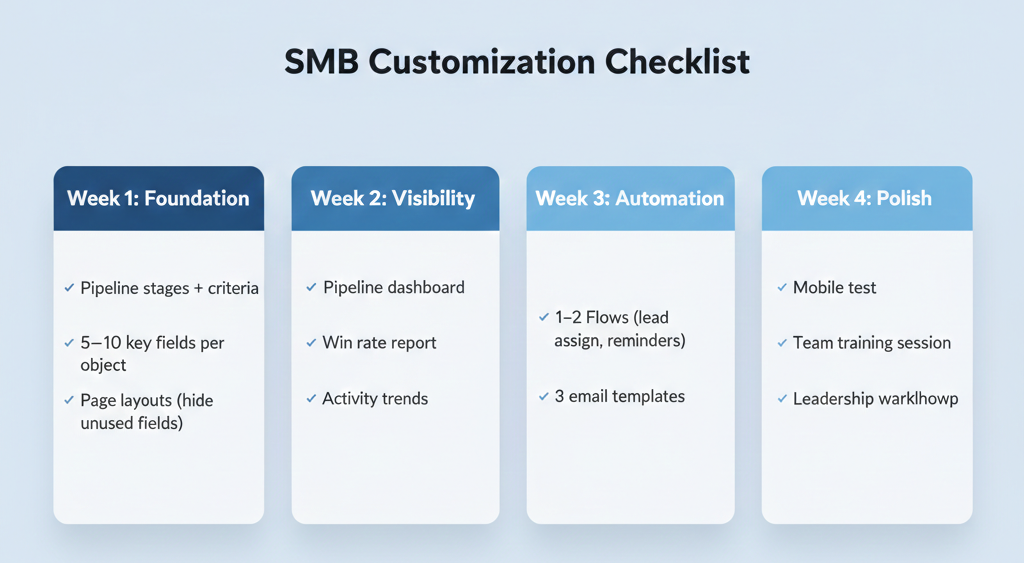
Pipeline stages + criteria
5–10 key fields per object
Page layouts (hide unused fields)
Pipeline dashboard
Win rate report
Activity trends
1–2 Flows (lead assign, reminders)
3 email templates
Mobile test
Team training session
Leadership walkthrough
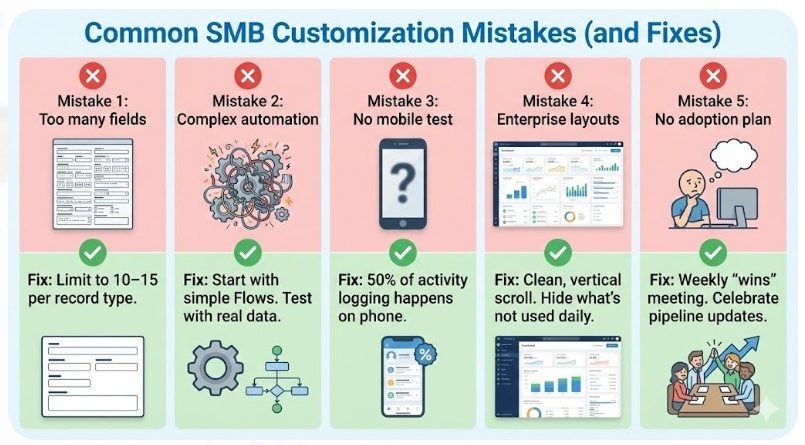
Mistake 1: Too many fields
Fix: Limit to 10–15 per record type.
Mistake 2: Complex automation
Fix: Start with simple Flows. Test with real data.
Mistake 3: No mobile test
Fix: 50% of activity logging happens on phone.
Mistake 4: Enterprise layouts
Fix: Clean, vertical scroll. Hide what’s not used daily.
Mistake 5: No adoption plan
Fix: Weekly “wins” meeting. Celebrate pipeline updates.
<10 users
Simple pipeline
Standard integrations
Someone on team likes admin work
Complex data model
Multiple clouds
Heavy integrations
Compliance needs
Hourly admin support ($100–$200/hr) beats full implementation for most SMBs.
Trailhead (guided projects)
Setup Assistant
Flow Builder
Duplicate cleaners
Report builders
Mobile enhancers
Salesforce Stack Exchange
Trailblazer Community
Customizing Salesforce for small business is about simplicity that scales, not complexity that impresses.
Start with a clean pipeline, 10 key fields, one dashboard, and 1–2 automations. Test with real data. Train your team to own it.
By Week 4, you’ll have a CRM that works like your business—not like a Fortune 500 demo.
Next step: Log into Setup today. Customize one picklist. Momentum starts there.
Read related : How to Choose Salesforce Customization Options: Your Complete, Friendly Guide (2025)

 Chatbot